
FOR ALL ONLINE BANKING CUSTOMERS
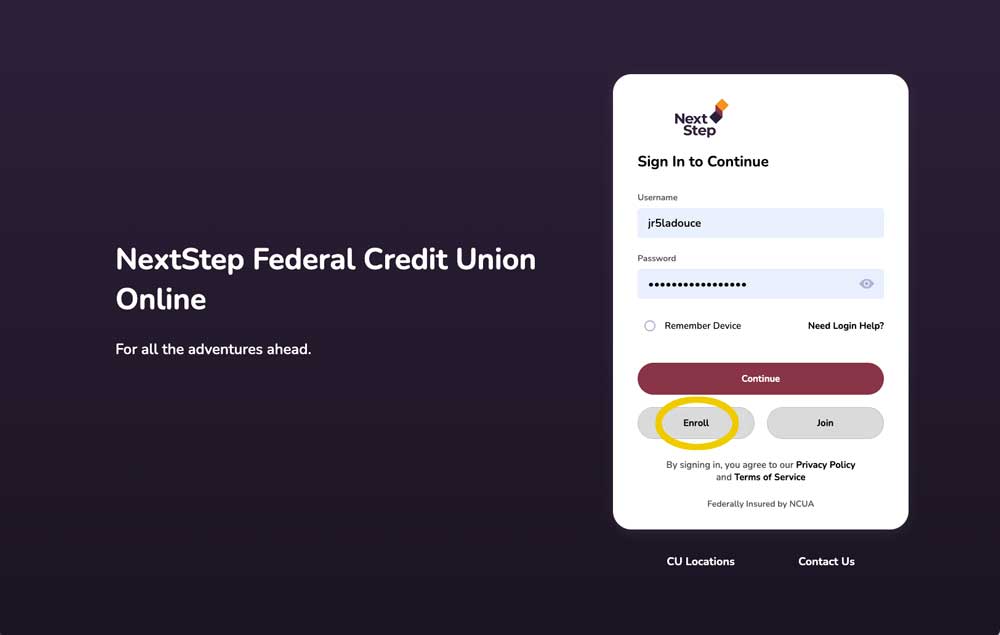
As of April 2, 2026, your accounts, balances, and transaction history will be accessible via our new and improved online banking portal. All you need to do is re-enroll.
- Visit our new online banking portal
- Re-enroll by clicking the ENROLL button below the CONTINUE button – you’ll be asked your member number, social security number, and date of birth
DOWNLOAD THE NEW NEXTSTEP MOBILE APP
Our upgraded online banking platform includes a new mobile app.
Please delete your legacy NextStep App and download the new NextStep App from the Apple App Store or Google Play.
FOR CUSTOMERS WHO USE NEXTSTEP AUTOMATIC BILL PAY
For security purposes, existing bill pay settings will not transfer to the new system. To ensure a smooth transfer, we encourage you to visit your bill pay account before March 30, 2026, and make a record of your current Automatic Bill Pay recipients.
ON or AFTER APRIL 2, 2026:
1. Make sure you’ve re-enrolled in Online Banking using the instructions above.
2. Once re-enrolled, simply set up your automatic bill payments using your record to ensure
uninterrupted, on-time payments. NOTE: Any currently scheduled recurring payments will need to be
rescheduled after April 1, 2026, in the new system.
FOR CUSTOMERS WHO USE PEER-TO-PEER PAYMENT APPS
FREQUENTLY ASKED QUESTIONS
Enrollment & Access
Q: Do I need to enroll in both online and mobile banking separately?
A: No! Once you enroll in the new online banking, you’re automatically enrolled in mobile banking as well. The same login credentials work for both platforms.
Q: Can I reset my password on my own?
A: Yes! The password reset process is now simpler. Just click “Forgot Password” or “Need Login Help” on either the online or mobile banking login screen.
Q: What if I can’t see an account I used to access?
A: Please contact us immediately! You can send a secure message or visit any branch location.
Your Accounts & Cards
Q: Will my account numbers change?
A: No! All account numbers will remain the same.
Q: Will my debit and credit cards be affected?
A: No! All debit and credit cards will continue to work as expected. You don’t need to do anything with your cards.
Q: What about my direct deposits?
A: Your direct deposits for payroll, pension, and Social Security will continue uninterrupted. No changes are needed.
Transfers & Payments
Q: What will happen to my recurring transfers and bill payments?
A: Recurring and future-dated transfers and bill payments will need to be re-established in the new system. Payments scheduled in the current system before [transition date] will continue to process. After [transition date], please set up your recurring transactions again in the new platform.
Q: Will Bill Pay work the same way?
A: Bill Pay will have an improved interface with additional features! While the experience is enhanced, you’ll need to set up your payees again after the transition.
Statements & History
Q: How do I access my statements?
A: You can access and download your monthly statements through online banking and the mobile app. When you first register, you’ll have the option to enroll in eStatements and eNotices.
Q: Will my prior transaction history be available?
A: Yes! Your transaction history will be available in the new online banking system.
Q: I can’t open eStatements or documents. What should I do?
A: Please check your browser’s pop-up settings. Several functions, including accessing eStatements, utilize pop-ups. Make sure pop-ups are enabled for our website. Account Alerts
Account Alerts
Q: Will my alerts carry over?
A: No, you’ll need to recreate your account alerts in the new system. You can set up alerts from your account dashboard or through the More/Plus menus. Alerts can be sent via email or text message.
Mobile Features
Q: Will Mobile Check Deposit work the same?
A: Mobile check deposit remains free and easy to use! You’ll notice an improved experience with better controls and easier check capturing.